
Your aircraft logbooks, searchable in seconds.
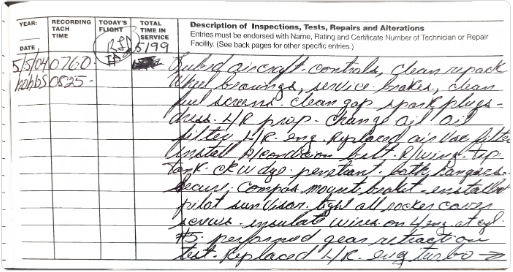
Fifty years of handwriting, typed up tonight. Snap the pages with your phone. GALogbook reads every entry and keeps the original page right beside it.
Ask your logbooks. They answer.
Type a word, a part or an AD number. Every matching entry comes up, with the original page one click away.
Example search on a sample aircraft.
There's only one copy of your logbooks.
Most airplanes have one set of logbooks, kept in a box, a hangar or a shop. If they're lost, damaged or misplaced, that history is hard or impossible to replace, and the airplane is worth less.
GALogbook keeps a complete, searchable copy, with every original page, safe online.
From a box of logbooks to records that answer back.
Bring in everything you have. GALogbook reads it, files it, and keeps your airplane's whole history ready to use.
Free scanner app
iPhone and Android. Scan logbook pages and receipts.
Text in new work
Text what was done from your registered phone. It becomes a draft logbook entry.
Logbook PDFs
Already scanned? Upload what you have.
FAA records packet
Upload the FAA's file on your airplane. Every 337 and airworthiness certificate gets found and filed.
AD lists & W&B reports
Your mechanic's AD report, weight & balance sheets.
Receipts, STCs, bulletins
Parts invoices, STCs, service bulletins, oil analysis.
Reads the handwriting
Decades of different mechanics' hands.
Types up and files each one
Entries by date and tach, into the right logbook. Part numbers and prices off receipts.
Matches your ADs
Checks AD numbers against the official FAA list and finds the entry that shows each was done.
You check it
Side by side with the original page before it's saved.
Ask in plain English
"When were the mags last done?" Get the answer and the page it came from.
Search everything
Every logbook and receipt: words, AD numbers, part numbers.
What's coming due
Annual, oil, mags, ELT, transponder. Time on each engine and prop.
AD worksheet & 337 reminders
Compliance at a glance. Repeat inspections never slip.
Weight & balance
Current W&B and its history, math checked.
Text or type new entries
Describe the work. Get a proper entry, printed on a label for the paper logbook.
Share with your mechanic
Your A&P or IA sees the same records.
Ready to sell
Complete, clean records for the buyer and the pre-buy.
Text it in from the airplane. Sign it when you're done.
Register your phone once. Start an entry by text when the work starts, add to it as you go, and GALogbook keeps track and builds a proper logbook entry. Review it, sign it, print the label.
Example aircraft shown. Your record fills in as your pages are read.
More than a logbook. Your whole airplane.
Everything that's usually in a box, a binder and a shoebox of receipts, in one place.
Searchable logbooks
Airframe, engine and prop logbooks typed up and organized, with the original scans kept.
AD compliance
Look up the ADs for your airframe, engine and prop, keep a worksheet, and find the entry that shows each one was done.
Form 337s
Every 337 in one place. See which ones need follow-up and get reminders for repeat inspections.
What's coming due
Annual, oil changes, magneto inspections, ELT, transponder and 337 repeat inspections, all on one list.
Weight & balance
Keep your current W&B with the airplane. GALogbook checks the math for you.
Receipts
Snap a receipt. GALogbook reads the part numbers and prices, so you can search by part number later.
New entries made easy
Type what was done and GALogbook writes it up as a proper logbook entry. Print it on a label for your paper logbook.
Share with your mechanic
Invite your A&P or IA to see the same records. No more mailing logbooks or emailing photos.
Also keeps: service bulletins, STCs and oil analysis reports.
For owners
- Stop digging through boxes of old logbooks
- Know what's due before it's overdue
- Have clean, complete records ready when you sell, for the buyer and the pre-buy
For A&Ps and IAs
- See the airplane's whole history before the annual starts
- Find past work and AD proof in seconds
- Spend less shop time on paperwork
You stay in charge.
The AI is a helper, not the mechanic. You look over everything it reads before it's saved, and the original page is always kept right next to the typed entry.
Once an entry is saved, it's locked so it can't be quietly changed later, which counts when it's time to sell.
Start with one logbook.
See what it finds.
Questions? Email support@galogbook.com